
DAW remote control and talkback for Mac
DarkStage Studio US$149 + applicable local taxes · One-time purchase
macOS 12 or later · Intel and Apple silicon. Some features need a newer macOS: Mac System Sound, Device Outputs and the Automatic source need macOS 14.2; the Offline Wi-Fi Network, FL Studio sync, DarkStage MIDI and Launch at Login need macOS 13.
macOS
One-time purchase
Button Panel, Hover Panel and Mutley

The problem
Recording yourself, or a player in the next room, means walking back to the desk to arm, start and stop every take.
And talkback lives on the monitor controller, so a producer on the couch or an engineer in the live room can’t easily speak to the performer.
Related: Show the counter and timecode · Recording light for the live room · DAW Sync compatibility
Controls
Button Panel
Up to two Button Panels per display, each with DAW-aware buttons, keyboard shortcuts, MIDI messages and knobs. Split a large set of controls across pages and flip between them.
Hover Panel
A pop-up panel of Button Panel keys you call up only when you need it, with its own presets and an auto-hide time, so it stays off the screen the rest of the time.
See what you pressed
Transport keys sit beside a bar/beat counter and a RECORDING IN PROGRESS warning, so a press from across the room is confirmed on screen and nobody has to call out to check.

A tuner beside the buttons
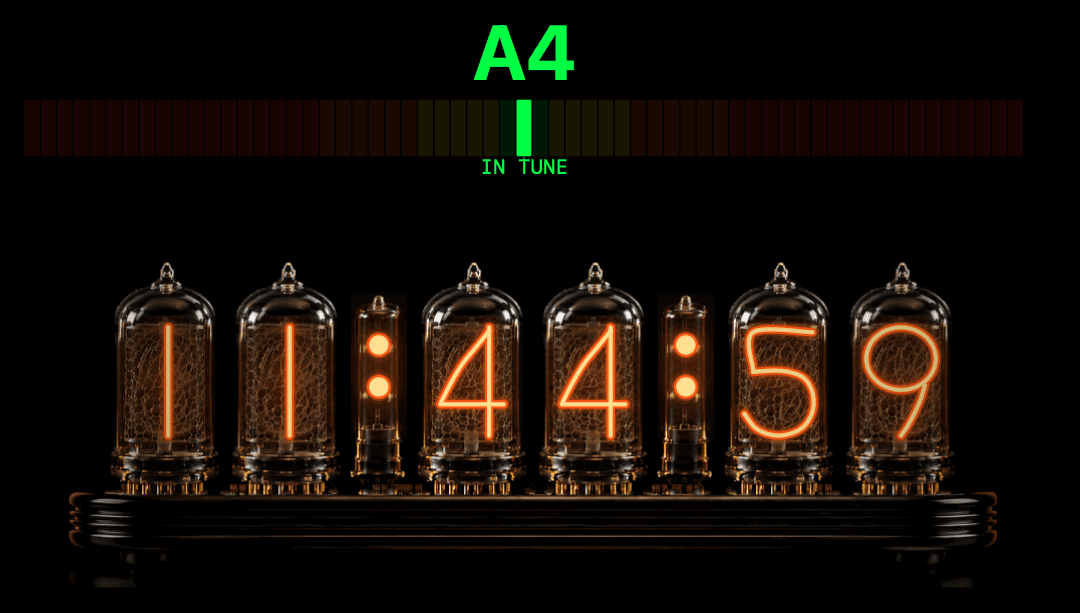
Between takes, the same display can show a tuner reading A4 in tune and a Nixie-tube studio clock, so a guitarist can check pitch without leaving the control screen.
Play, Stop, Rec, Loop and yours
The basics sit together: Play, Stop, Rec and Loop, lit by your DAW’s transport (Rec and Loop where your DAW has a factory key for them). Alongside them, four custom buttons send whatever shortcut or MIDI message the session needs.

Push-to-talk with Mutley
Mutley Control gives talkback a dedicated push-to-talk key on a Mac display or a Remote. It works with the DarkStage Mutley plug-in (AAX, AU or VST3), which handles talkback and FX mute.
Knows your DAW
Button Panel keys know Pro Tools, Logic Pro, Cubase, Ableton Live, FL Studio and REAPER: their lamps follow DAW Sync, and each key sends that DAW’s own factory command. Any key can send a shortcut or MIDI instead.
DarkStage Studio
Complete edition
DarkStage Studio
The complete edition: every DarkStage feature.
Every DarkStage feature in one edition: display blackout and presets, professional stereo metering and analysis and DAW Sync, plus iPads and browsers as WiFi Remotes, Cameras, multichannel metering and four stereo inputs.
US$149
+ applicable local taxes
Highlights
• DAW Sync: Pro Tools, Logic Pro, Cubase, Ableton Live, FL Studio, REAPER
• PPM / VU, Needle VU, LUFS, Loudness Range, PLR, PSR and True Peak
• Spectrum RTA, spectrograms, oscilloscope, scope and correlation
• Button Panel, Hover Panel and Mutley Control
• WiFi Remotes: any device with a browser becomes a display
• Cameras
• Offline Wi-Fi Network: no router needed (macOS 13+)
• Four stereo inputs (A–D)
• Multichannel input up to 64 channels, with Meter Bridge PPM and VU
• Display presets, Preset Looper, utilities and all 18 visualisers
Best for
Self-recording artists, producers who work from the couch, engineers moving between control room and live room, and studios that want talkback away from the desk. Control Room covers Mac displays only.
macOS 12 or later · Intel and Apple silicon. Some features need a newer macOS: Mac System Sound, Device Outputs and the Automatic source need macOS 14.2; the Offline Wi-Fi Network, FL Studio sync, DarkStage MIDI and Launch at Login need macOS 13.Compatibility · Getting started
Compare all editions →
Workflow
01
Connect DAW Sync
Set up DAW Sync so transport keys know whether your DAW is playing, stopped or recording.
02
Lay out the Button Panel
Add keys for Play, Stop, Rec and Loop, then custom keys for shortcuts, MIDI and knobs, split across pages if needed.
03
Add talkback
Insert the DarkStage Mutley plug-in on your talkback channel and place a Mutley Control key where the producer sits.
04
Pair the iPad
With DarkStage Studio, scan the QR Connect code on the iPad and give that Remote a panel layout of its own.
All prices are in USD and one-time, plus applicable local taxes, which CREEM, our authorised reseller and Merchant of Record, calculates at checkout from your location. The full total is shown at checkout before you pay. Each licence is perpetual and activates on up to 3 Macs.
Email newsletter
STAY IN THE LOOP
Get DARKSTAGE release notes, new features and product updates.
This is our marketing newsletter. Subscribing does not send you a download link. We’ll email you to confirm your subscription, and you can unsubscribe at any time.
Download the free 30-day trial →