
Actual Screen Recording
Overview
If you'd like to listen more than you look, DarksStage is for you.
If you love meters, analytics or the vibe of a vintage oscilloscope, DarkStage is for you.
No more switching off screens manually, or waiting for a sleeping screen to wake or accidental hot corner triggering of the screensaver. DarkStage gives you direct control over what each connected display shows. A screen can become completely black, wake only when you need to make a mix adjustment, display a thin transport triggered border to let you know you're still recording or operate as a dedicated visual monitoring surface or remote control for the DAW
Each display can be configured independently, allowing DarkStage to fit editing rooms, recording spaces, mix rooms, mastering studios and presentation environments.
Core Capabilities
Display Blackout
Turn selected displays into clean, controlled black surfaces without changing your physical monitor arrangement or disconnecting screens. All triggered from custom shortcuts.
Mouse Peek
Grab the mouse to temporarily reveal the screen beneath DarkStage, make your mix adjustment then return automatically to blackout. Targeted sensitivity only wakes the single display you need.
Professional Metering
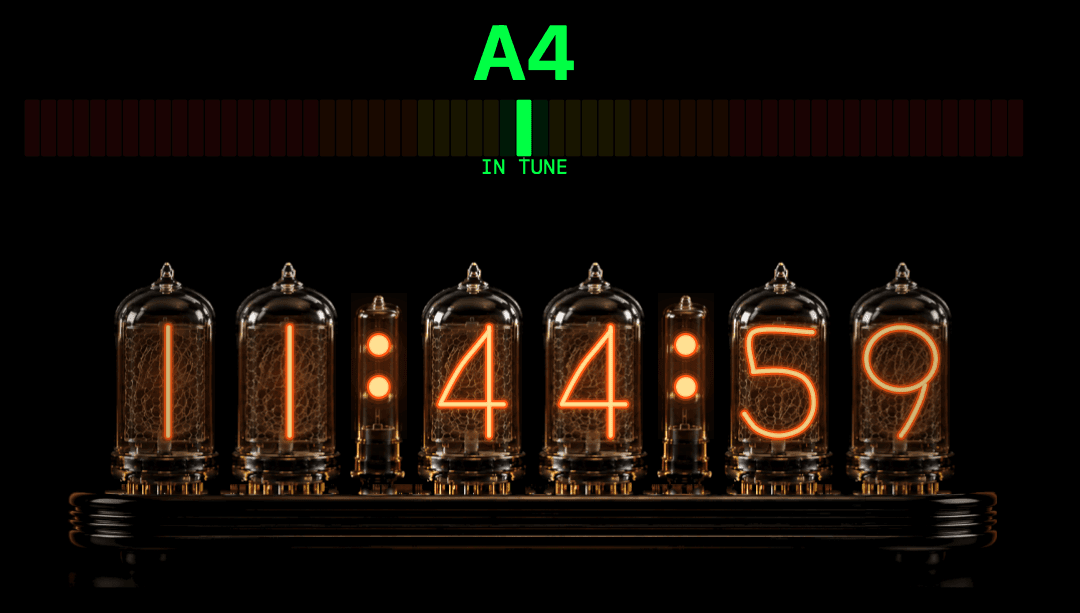
Full custom control of the look, feel, style and response of your meters. Choose from Bars, LED, Nixie,

Wireless Displays
Revive and old iPad as meters, a recording light for the live room, a warning on the studio door or bars:beats display for the string section to follow.

Are We Rolling?
In the live room, display transport state using borders, counters and visual indicators driven by compatible HUI/MTC/MMC information.
The artist always knows when we’re rolling. No more false starts.

Audio Analysis
View real time spectrum, waveform, scope, polar and related analysis widgets without crowding the main DAW workspace.

Multi Channel Metering
Keep an eye on up to 64 input meters while tracking. Breathe new live into old gear by building a meter bridge for your old console or 4-track. LED, Plasma & VU meters. In any colour size and style you can imagine.

Utilities
Quickly show a tuner to the musician or flash in sync with the metronome Display simple text messages or show a clock. A suite of visualisers and a notepad is included
Pin Any App Window To An Overlay
Any app window can be targeted to display through the blackout and be resized to fit with widgets, Show the video or lyrics or a DAW window.

Dual Stereo Inputs
Each Audio widget features dual inputs to enable any element of a mix to be metered seperatly. Eg, measure pre and post limiter

Button Control Panel
Create a remote button panel to act as a transport or assign any key shortcut combination to trigger the DAW

Display Presets & Looper
Build your ultimate display and move quickly between configurations for recording, editing, mixing. Assign up to 4 presets to a loop to scroll through them via a shortcut
Host 3rd Party Plugin Meters
AU Plugin hosting for displaying your favourite meters and analysis plugins you already trust.
Flexible Audio Routing
Utiliize any core audio device and its channels or virtual busses to tap into any part of your signal or mix chain. Measure LUFS pre final limiting or send your synth the oscilloscope or tuner.
Tap Directly Into System Audio
Take a feed of the system audio for hassle free metering. No change in workflow. No routing. No worries. For OSX 15 and above.
Editions
DarkStage Nothing
Nothing is free to keep after trial
Nothing will help you listen better. Nothing is yours. Nothing is forever.
Free
No cost
Download DarkStage
Includes
• Blackout control for one display
• Programmable shortcut
• One factory audio display preset
• System audio capture
• Lightweight studio operation
Best for
Anyone who needs single display blackout control at no cost. Keep the blackout feature at the end of the 30 day trial.
DarkStage | Blackout
Focused display control.
For studios that need clean blackout, fast screen access and simple visual transport feedback without the complete analysis toolkit.
$19
One-time
Buy Blackout
Includes
• Independent blackout control for connected displays
• Standard Peek
• Transparent Peek
• Cursor hiding
• Configurable display borders
• Saved display setups
• Lightweight studio operation
• Simple clock
• Visualisers
• “Where’s My Mouse” - Locater
Best for
Anyone wanting to blackout displays. Recording rooms, voice-over booths, client displays, projection environments and anyone who primarily needs controlled darkness.
DarkStage | Control Room
DAW following and Audio Analytics
Includes the Blackout toolset and adds professional meters, scopes, analysis widgets, display presets and deeper visual customisation.
$99
One-time
Buy Control Room
Everything in Blackout, plus
• DAW Sync
• Transport-aware border behaviour
• Professional peak, PPM and VU-style metering
• Spectrum RTA
• Waveform display
• Oscilloscope and stereo scope tools
• Polar and stereo visualisation
• Loudness and level monitoring tools
• HUI transport widgets
• Transport counters
• Configurable text and utility widgets
• Widget positioning and sizing
• Widget colour and appearance controls
• Global widget presets
• Factory display presets
• Dedicated layouts for multiple studio tasks
• Single AU plugin meter hosting (beta)
Best for
Mix engineers, Producer/Beat Makers, Mastering Engineers, editors and studios building dedicated visual monitoring displays.
DarkStage | Studio
Wireless, networked and broadcast-ready.
Includes the entire Mix toolset and adds browser-based wireless displays, networked broadcast, video and talkback links, DAW transport remotes and multichannel metering.
$149
One-time
Buy studio
Everything in Mix, plus
• Resurrect old devices — anything with a browser
• Multichannel audio meters (meter bridge)
• Custom Remote Button Panel for DAW control.
• Individual wireless standalone displays over your network
• QR code display syncing
• Common broadcast layout — one display to many devices
• Video link between remote displays
• Push-to-talk between devices
• DAW transport remotes & buttons
Best for
Tracking and live rooms, multi-room studios and engineers who need synced, networked displays across every device.
Comparison
Display and Visibility
Feature
NOTHING IS Free
DarkStage Blackout
DarkStage
Control room
DarkStage studio
Display Blackout
1
Programmable Shortcuts
Standard Mouse Peek
—
Transparent Mouse Peek
—
Wireless Displays Via Airplay
—
Cursor Hiding
—
Full Display Presets
1 x Factory
Preset Looper
—
Custom Border Styles
—
Mind Bending Visualisers
—
Where’s My Mouse?
—
Resurrect Old Devices — Anything With A Browser
—
—
—
QR Code Display Syncing
—
—
—
Individual Wireless Standalone Displays Via Network
—
—
—
Common Broadcast Layout — Same Display To Multiple Devices
—
—
—
DAW Following Pro Tools , Logic Pro, Ableton, Cubase, FL Studio, REAPER
Feature
NOTHING IS Free
DarkStage Blackout
DarkStage
Control room
DarkStage studio
Display Border
—
—
Transport Status
—
—
Big Counter
—
—
SMPTE / MTC
—
—
Metronome - Flash / Numeric / Solid Shape
—
—
Status Text
—
—
DAW Transport Remotes
—
—
—
Utilities
Feature
NOTHING IS Free
DarkStage Blackout
DarkStage
Control room
DarkStage studio
Text Display
Limited
Studio Clock
—
Photorealistic Nixie Tube Clock
—
Tuner
—
—
Assignable Push Button Panel
—
—
—
Metering and Analysis
Feature
NOTHING IS Free
DarkStage Blackout
DarkStage
Control room
DarkStage studio
VU-style metering
—
—
Photorealistic VU Meters
—
—
Peak and PPM metering - LED / Nixie / Bar
—
—
Photorealistic Nixie Counters
—
—
Spectrum RTA - Line / Filled / LED / Nixie / Bar
—
—
Waveform Oscilloscope
Limited
Limited
LUFS Meters
—
—
Spectrogram 2D
—
—
Spectrogram 3D
—
—
Spatial Spectrogram
—
—
Rolling Waveform
—
—
Scope X/Y
Limited
Limited
Correlation Meter
—
—
Polar Sample
—
—
Polar Level
—
—
Meter Bridge / Multichannel Input Engine
—
—
—
Visualisers
—
Third Party AU Plugins
Feature
NOTHING IS Free
DarkStage Blackout
DarkStage
Control room
DarkStage studio
AU plugin meter hosting
—
—
Audio Engines & Inputs
Feature
NOTHING IS Free
DarkStage Blackout
DarkStage
Control room
DarkStage studio
System Audio - Requires Mac OS 15 & Above
Any Available Core Audio Device
Any Available Virtual Audio Device
Multichannel Input
—
—
—
Workflow
01
Choose a display
Select any connected display and decide whether it should be blacked out, used for transport feedback or turned into a dedicated monitoring surface.
02
Build the view
Add only the meters, analysis tools and information needed for that display’s job.
03
Save the setup
Store layouts for recording, tracking, editing, mixing, mastering or client review.
04
Recall it when needed
Move between studio tasks without rebuilding the workspace or scroll through you favourite displays via the preset looper.
All prices in USD. Taxes calculated at checkout. Payments are securely processed by CREEM our authorised reseller and Merchant of Record.
Stay In The Loop
Join the list and we’ll send the latest DarkStage beta build plus setup notes and updates.
Professional macOS tools for studios and DAW workflows.